Node Composer 3.0 is here.
This release is more than a collection of new features. Over the last few weeks, we have been rebuilding important parts of Node Composer around a broader idea:
AI should amplify the creative process, not make creators adapt their process to the limitations of AI tools.
Node Composer is designed for people who work with creativity as their profession — photographers, filmmakers, designers, artists, creative agencies, visual communicators and anyone using generative AI to turn an idea into something tangible.
Version 3.0 takes a significant step in that direction. It introduces three new nodes, a completely rebuilt generator experience, a much larger model catalogue, broader provider support and a series of interface improvements designed to make complex creative workflows easier to understand and control.
A new generation experience
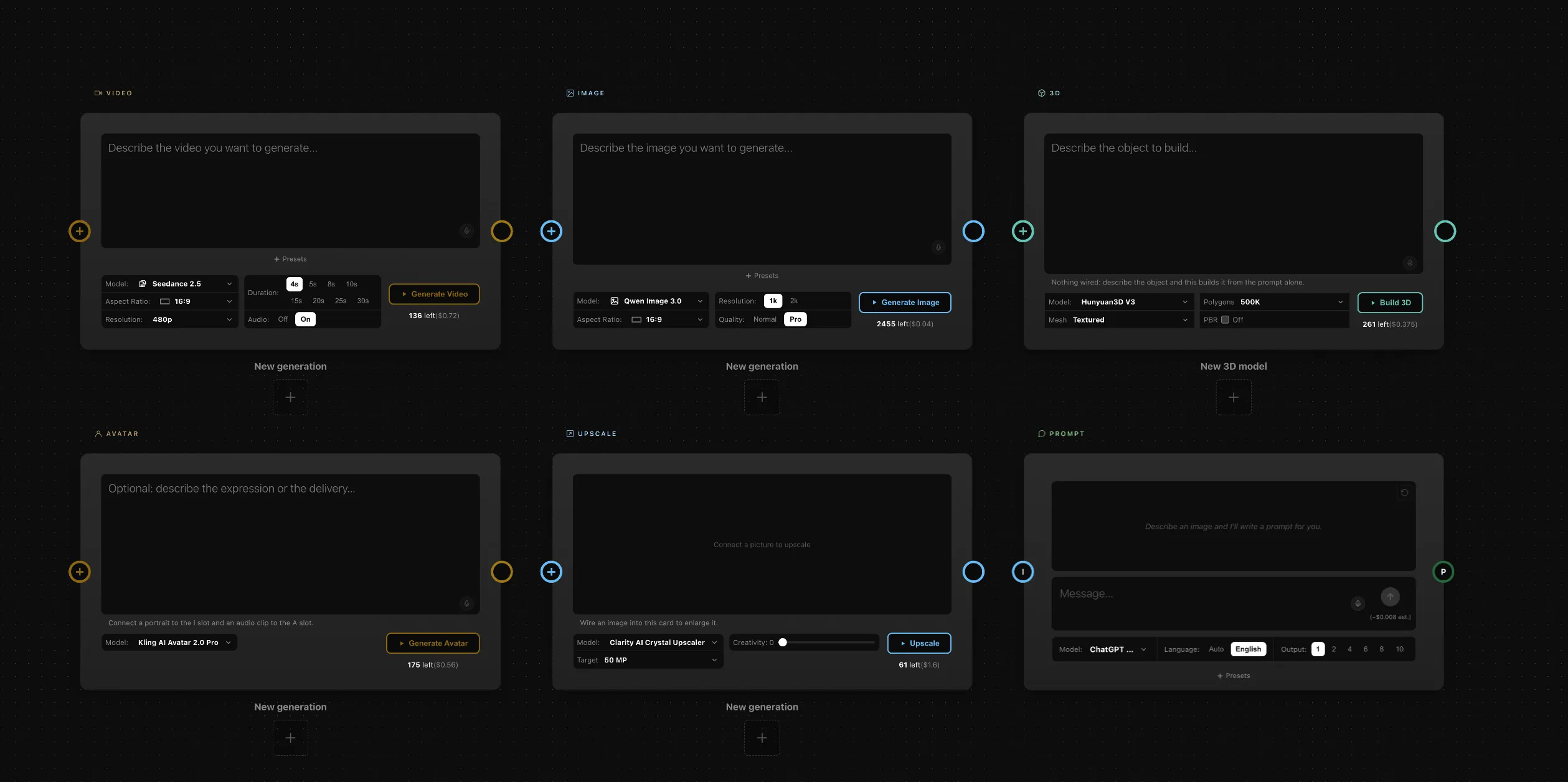
One of the biggest changes in 3.0 is how generation itself works. Image, Video, Avatar and Upscale generators are now self-contained cards.
Instead of creating a new output node every time you generate something, each generator keeps its own results inside the card. Settings live directly within the frame, while previous generations are collected in a strip along the bottom.
This changes the role of a generator inside the canvas. It becomes a place you return to, refine and explore — rather than a temporary step that continually creates more nodes.
You can:
- + to start a new generation
- Regenerate to run the same setup again
- Browse previous results without leaving the card
- Keep your workflow and its generated results together
Existing projects are supported too. When opening an older project, Node Composer can convert existing generator chains into the new cards while preserving results and connections. An export is offered first, so you always have a way back.
Three new ways to work
Version 3.0 introduces three completely new nodes: 3D, Layer Composer and Workflow.
The 3D node
The new 3D node moves beyond generating a picture of an object. It creates a real mesh.
Describe an object or provide a photograph and generate a 3D asset that can be viewed directly on the canvas. You can work with its texture, apply colour to an untextured mesh and choose the angle from which the object is viewed.
That viewpoint can then continue downstream as an ordinary image, allowing the 3D asset to become part of an existing visual workflow. The mesh itself can also be connected to a Layer Composer or downloaded as a file.
Layer Composer
The Layer Composer introduces a different way of thinking about visual generation. Instead of asking AI to describe an entire scene in a single prompt, you can build the scene from individual elements.
Connect multiple images and they become layers that can be positioned, scaled and stacked. You can also draw and add text before sending the flattened composition further down the workflow.
3D objects are first-class elements inside the Layer Composer. A mesh can have its own camera angle within a composition, independently from the original 3D node and from other compositions using the same asset.
This makes the node less about generating an image and more about directing and constructing a visual scene.
Workflow
As creative workflows become more sophisticated, the canvas can become complex. The new Workflow node lets you fold part of that complexity away.
Select a section of your canvas and turn it into a reusable Workflow. The entire graph becomes a single node that can be opened, edited and expanded again whenever needed. Workflows can have multiple outputs, preserving every endpoint of the original graph, and once a workflow is running it continues even if its internal editor is closed.
Complexity doesn’t disappear. It becomes manageable.
More models. More choices.
Node Composer 3.0 significantly expands the models available inside the platform.
Image
- Qwen Image 3.0 — Normal / Pro
Video
- Seedance 2.5
- FLUX 3
Prompt generation
- ChatGPT 5.6 Luna (available on WaveSpeed)
- Claude Sonnet 5 (available on WaveSpeed)
One workflow. Multiple providers.
Node Composer continues to follow its Bring Your Own API Key philosophy. Most of the new model catalogue can run through either WaveSpeed or Runware: choose your provider in Settings and the same generator cards continue to work, while the generation cost follows the provider you have selected.
This is important to how we think Node Composer should evolve. Creators should not have to rebuild their creative workflow every time a better model or provider becomes available.
The workflow stays. The models can evolve.
A clearer canvas
Version 3.0 also introduces a visual language that makes complex workflows easier to read. Every node type now has its own colour, and those colours travel through the connections into the sockets — at a glance, you can understand what is connected to what.
The same visual language extends to the Media Library, where images, objects and other media are easier to distinguish. Deleted results are now moved to a Trash rather than disappearing immediately.
These are small changes individually. Together, they make a complex canvas considerably easier to navigate.
Building the foundation for what comes next
Node Composer 3.0 represents an important shift in the product. The introduction of 3D, Layer Composition and nested Workflows expands what can be built on the canvas, the rebuilt generator cards change how creators interact with AI outputs, and the growing model catalogue and multiple provider support make the system more flexible as the generative AI landscape evolves. The interface improvements, in turn, make increasingly sophisticated workflows easier to understand.
But the most important change is the direction behind all of this. We are not building Node Composer simply as another place to generate images or videos: we are building a creative workspace for people who already have a vision and want AI to help them explore, construct, refine and execute it.
Your ideas remain at the centre.
The models are tools.
The workflow is the bridge between the two.
Node Composer 3.0 is the next step in building that bridge.
Your Vision. Amplified by AI.